
Business account
Here are our answers to the most frequently asked questions about JioSign
What is a JioSign business account?
JioSign business accounts are meant for organizations or business users. It enables an organization to manage their users and the documents executed by them on behalf of the organization on JioSign. With business accounts, an organization can create different departments as Teams and Sub Teams and add Team Users to a Team.
I am new to JioSign. Should I create a personal account or a business account?
You can sign up for JioSign as per your profile. If you intend to use jioSign only for your own personal use, then you may sign up with a personal account. If you want to use JioSign for executing documents for your business as well as you will be requiring other users in your organization also to use JioSign and you want to manage those users and the documents executed by them then you may sign up with a business account. Please note that you can always migrate from JioSign personal account to JioSign business account as per your requirement.
How can I sign up for a JioSign business account?
You can log on to JioSign.com and go to the signup/create account. You will have to select business from the top tab and fill in details about your business. Please note that you will have to add a business account manager for your new JioSign business account. You can either add yourself or invite someone else to be a business account manager.
I am signing up on JioSign as a business user, and it is asking me to assign a business account manager during signup?
During signup for business account, you need to assign someone as a business account manager so that they can manage the business account on an ongoing basis. A business account manager is the one who has full control over the business account. A business account manager is like the super admin of the business account and can add users as Team Managers, Team Users and manage all the documents. You can add yourself as a business account manager or invite someone else to become a business account manager. Please note that if you make someone else as the business account manager of your organization’s account while signing up, you will not be able to access the business account, as only the assigned business account manager will be able to control & manage the business account.
I am signing up for my organization’s account on JioSign and I will be managing the JioSign business account on my organization’s behalf. Can I make someone else the business account manager?
If you want to manage your organization’s business account, then you need to make yourself the business account manager during the signup process. If you make someone else a business account manager, then you will not be able to access and manage the JioSign business account that you are signing up for.
I have signed up as a JioSign business account manager for my organization. What roles can be performed by a business account manager in a JioSign business account?
A business account manager is the one who has full control over the business account. As a business account manager, you can add or remove Team Users and Team Managers, manage documents executed by users on JioSign, and use JioSign to execute documents on JioSign on your organization’s behalf.
I am a business account manager; how can I create Teams and Sub Teams for various departments in my organization in my business account?
You can go to the Manage Teams tab and create Teams and Sub Teams. The Team & Sub Team feature allows you to add various departments and their users. You can also create a Team and assign a user to become their Team Manager. You can create up to three levels of hierarchy using Sub Teams; however, you can add as many Teams at the same level as you want.
Can a Sub Team User see other users’ documents or users or Sub Teams?
Only users who are assigned the role of a Team Manager can view the documents and information for their respective Teams and Sub Teams as per hierarchy.
I have joined the JioSign business account as a business account manager, and I want to add my team members to JioSign. How do I add users to my organization’s business account?
A business account manager or a Team Manager can add Team Users by going to the Manage User option on the profile page. To add the user, click on the Add user button and then enter the user’s name, email address, title, mobile number, team, and role of the person. Once you send it, the user will get an email or mobile invite from JioSign to join your Team on JioSign.
I have joined the JioSign business account as a business account manager. I want to remove existing Team Users or the Team Manager of my business account. How do I remove users from a business account?
As a Team Manager/business account manager, you can remove existing users by going to the Manage Users option on the profile page. In the Manage user tab, select the users you want to delete and click the delete button. Confirm the delete action and the user will be removed. Please note that if you want to change some information or the role of the existing users, you can do so by editing the details instead of deleting them and adding them again. Team Managers can remove team members from their respective Teams and the linked Sub Teams.
I have joined the JioSign business account as a business account manager. I have added a user with the wrong details. How can I edit the Team member (Team User/Team Manager) details?
As a business account manager, you can always edit the details about the existing users of your Teams and linked Sub Teams by going to the manage users tab under profile. Click on the edit icon next to the user whose details you want to edit, it will open the user details in edit mode. Once you complete editing, click on submit to save details.
Note that only Team Managers can change team members’ roles in their respective Teams and the linked Sub Teams.
I have joined JioSign as a business account manager, can I add more Team Managers to my business account?
Yes, you can add multiple Team Managers to your JioSign business account. We suggest having multiple Team Managers to ensure that there is always one Team Manager to manage the Team if one of the Team Managers is absent.
I have joined JioSign as a business account manager; do I need to create separate signatures for a business account and a personal account?
No, you do not need to create a separate signature for a business profile and a personal profile. Just go to the profile page of any of your accounts and add your signature. Once the signature is successfully added you will be able to use these signatures from your personal as well as business profile.
I am a business account manager and I have added some contacts to my business account profile. Can I give access to the contact list to all business account Team Users?
Yes, all the contacts added to your business account profile will be accessible to all the business account Team Users.
I have been invited to join JioSign as a Team Manager for a team/department. What roles can I perform as the Team Manager of the assigned team/department?
As a Team Manager of your assigned team/department, you have complete control over the users and documents of that team/department. You can add/delete/modify members, manage and view documents executed by them, and create new Sub Teams.
I have joined JioSign’s business account as a Team Manager. How can I add my team members to my assigned Team in my JioSign business account?
As a Team Manager, you can add new users to your assigned Team and all its associated Sub Teams. Go to the manage user option on the profile page and enter your team members’ details in the add user popup. Next, click on submit, and the users you have invited will receive an email from JioSign with an invitation to join your Team.
I have joined JioSign’s business account as a Team Manager. I have existing users whom I want to remove. How do I remove users from a business account?
As a Team Manager, you can remove existing users from your assigned Team and its associated Sub Team. Go to the manage users option on the profile page. In the manage user tab, select the users you want to delete, click the delete button, and confirm that the user will be removed.
I have joined the JioSign business account as a Team Manager. How can I edit the Team member’s (Team User/Team Manager) role and details?
As a Team Manager, you can always edit the details about the existing users of your Teams and linked Sub Teams by going to the manage users tab under profile. Click on the edit icon next to the user whose details you want to edit and fill in the new details from the edit user pop-up and click submit.
Note that only Team Managers can change team members’ roles in their respective Teams and the linked Sub Teams.
I have joined the JioSign business account as a Team Manager. I want to create Sub Teams inside the Team I have been assigned. How can I create these Sub Teams?
You can create Sub Teams under the Team you have been assigned to by going to the Manage Teams tab under the profile and clicking on the “+” button next to the name of the Team you have been assigned. You can also create a hierarchical structure of Sub Teams by clicking on the add button next to the Sub Team and adding more Sub Teams.
I am changing my email ID/mobile number. How do I transfer my Team Manager role to a new email?
To transfer your Team Manager role to your new email/mobile number. You need to add your new email/mobile number as a new user and assign that to a Team Manager role. Then you need to accept the invitation using the email/SMS received from JioSign. Now login to the new account and remove your old email ID if you wish.
I am a Team Manager, and I have created a Sub Team with the wrong name. How do I rename the Team name in the JioSign business account?
As a Team Manager, you can change the names of Sub Teams associated with your Team by going to the Manage Teams option under your profile. Click on the edit button next to the Team name you want to change and fill in the new name. Click save and your Team name has changed now.
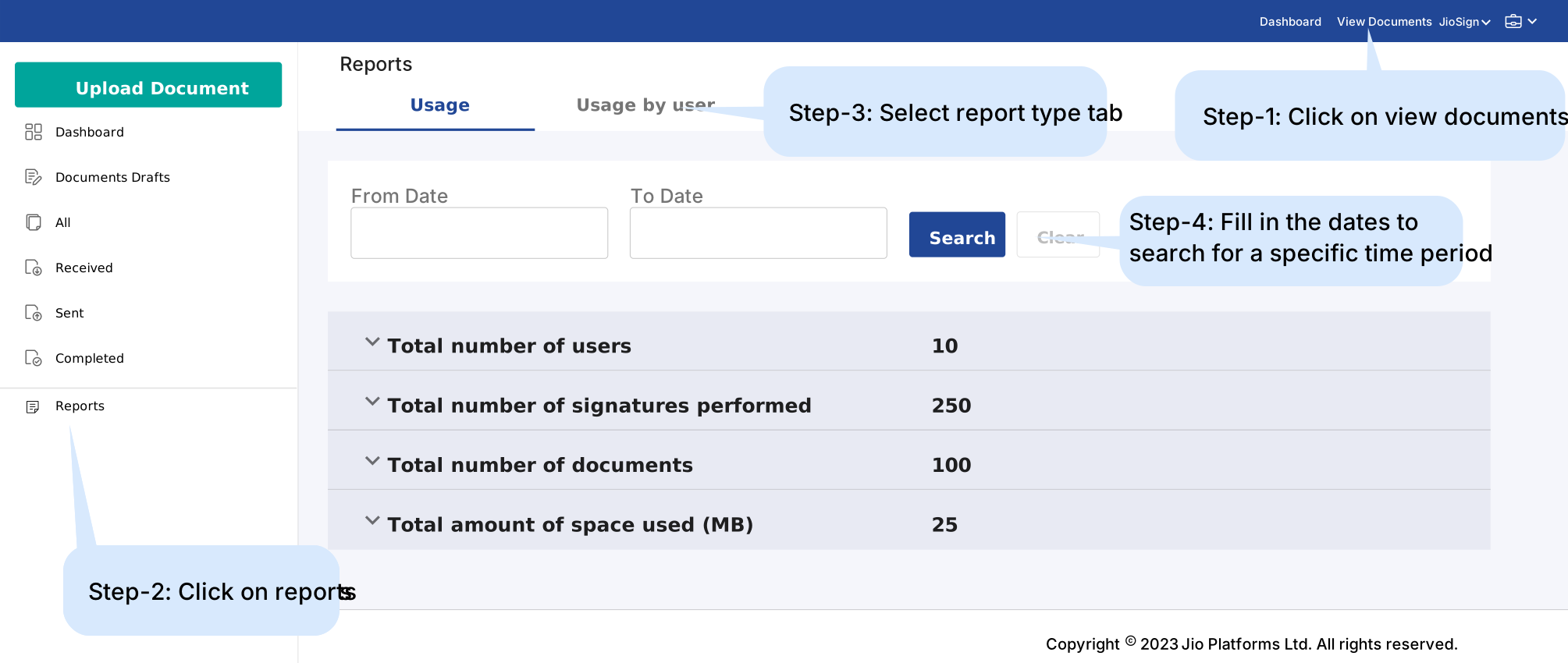
How can I see a report of JioSign usage for my business account or Team?
To track usage of JioSign for your business account or Team, navigate to the view documents section and follow the steps shown below:
I have been invited to join JioSign as a Team User. What is a Team User and what are the roles of a Team User in JioSign business accounts?
Team Users are members of a business account and their access to JioSign services are controlled as per the Team policy they join. However, they have full control of their personal JioSign account. Team User can upload documents in the business account Team repository and invite users to sign. In addition, they can access and modify or delete an owned document uploaded in a business account Team repository.
As a Team User, do I need to create separate signatures for my business profile and my personal profile?
No, you do not need to create separate signatures for your business profile and your personal profile. Just go to the View profile page of any of your business or personal profiles and add your signature. Once the signatures are successfully added, you will be able to use these signatures from any profile associated with your mobile number or email.
I am a Team User. I have added some contacts to the business profile. Can all the users of my organization use the added contacts?
Yes, you can add contacts to the business profile which can also be used by all the users in the organization’s business account.
As a Team User in a JioSign business account of my organization, I want signed documents to be visible in my business profile. Do I need to upload documents separately to business account for signing?
Since you are already added as a Team User in your organization’s JioSign business account, you can simply set the business profile as your default view to get all the documents in your business profile. Using the move feature, you can also move your documents from one profile to another.
I am a Team User and I want to transfer my documents from my personal profile to a business profile. How can I move a document from one profile to another?
You can move the documents in three simple steps:
- Select the document and click on the move option from the top ribbon.
- A popup will appear asking you to select the profile where you want to move the document.
- Select the profile and click on save location. Your document has been moved.
I have multiple accounts with JioSign. Can I see all the documents sent to multiple accounts under one business account?
Yes, ask your Team Manager to add all your mobile numbers and emails (JioSign account identity) under your user’s name while sending you an invitation to join a business account. You will need to accept the invitation from each of these mobile numbers and phone numbers. Once you accept the invitation, you will see all your documents under the business account. For your existing document, you may need to move it to your business account. Please note that this link is only for business accounts, and individual accounts related to these identities are not linked.
I have multiple phone numbers and email IDs on which I receive documents. How do I see all these documents under one user in a business account?
To see documents received on multiple phone numbers and email IDs under one user in the business account, you need to ask your Team Manager to add all your identities (emails and mobile numbers) to your Team User. The Team Manager can do so by clicking on the add more button below the email and mobile number.
What is the default view?
When you are added to a business account or create a business account in JioSign using your email or mobile number, you get two profiles I.e., a business profile view and a personal profile view. You can select any one of the views to be your default view. Documents you are invited to sign with your mobile number/email will be first sent to your default view. You can always move a document from your default view to another. In simple terms, you can select any view linked to your profile as a default view based on where you want all your documents to go initially.
I don’t want all the documents received by me to be shared with the business account. How can I control personal document access to my JioSign business account?
To control access to personal documents in JioSign, you can start receiving all the documents sent to you on your personal view by setting up your personal view as the default view. Once you have received the documents, you can always decide to move the relevant documents to your business view and keep your personal documents in your personal view.
I want to receive my documents in my personal account. How can I switch my default view?
You can change your default view in three simple steps:
- Go to the account you want to set as your default view.
- Click on the View Profile option from the top right and click on the button that says set this account as your default view.
- Select the account you want to set as the default view and click proceed. Your default view has been changed.
I have uploaded a document on JioSign and I am not able to find the document when I login?
Documents you upload to JioSign can be accessed only through the view used to upload the document initially. You can always decide to move that document from one view to another if you wish to do so. Check the document in your other view by switching view from the top right.
I am not able to see my received documents in the business profile. Where can I find my documents?
All your received documents initially go to your default view. You can choose to keep your documents there or move them to your other view(s). If you cannot see your received documents, check them in your other view.
My team is using JioSign business account. How can I join my organization’s business Account?
If your team has an existing business account, contact your organization or Team Manager to add you to the business account. Once they add you to the business account, you will receive an email to accept the request. Accept the request and start using the business account.
I am worried about the privacy of my documents. Can Team members see documents sent by other members of the Team?
No, Team Users do not have access to documents uploaded by others. To see the documents within a Team and its Sub Teams, a user should be Team Manager for that Team. If you want specific members of the Team to see documents uploaded by other Team members, you need to add them as Team Manager for that Team.
Do I have to pay for users I add to my Business Account?
No, JioSign Business Accounts have no limit on the number of users, and you can add new users to your account without incurring any user-based additional charges. Read more about JioSign Pricing & Payments.
Can other users in my Business Account use my credits?
Yes, credits purchased for your JioSign Business Account are shared among all team members within that account.